




Understanding your NHS payslip
Richard Pembridge, SoR's national officer for HCPC, legal and representative support, demystifies the jargon on your payslip and answers some common questions


The NHS payslip is a busy, jargon-filled document that can be a real challenge to understand, especially in the initial months of your first paid post.
But it is essential to get a grip on the details because it’s your responsibility as an employee to check your payslip every month and to report anything you think is incorrect to avoid under or overpayments. This quick guide to the basic terminology should help you get started.
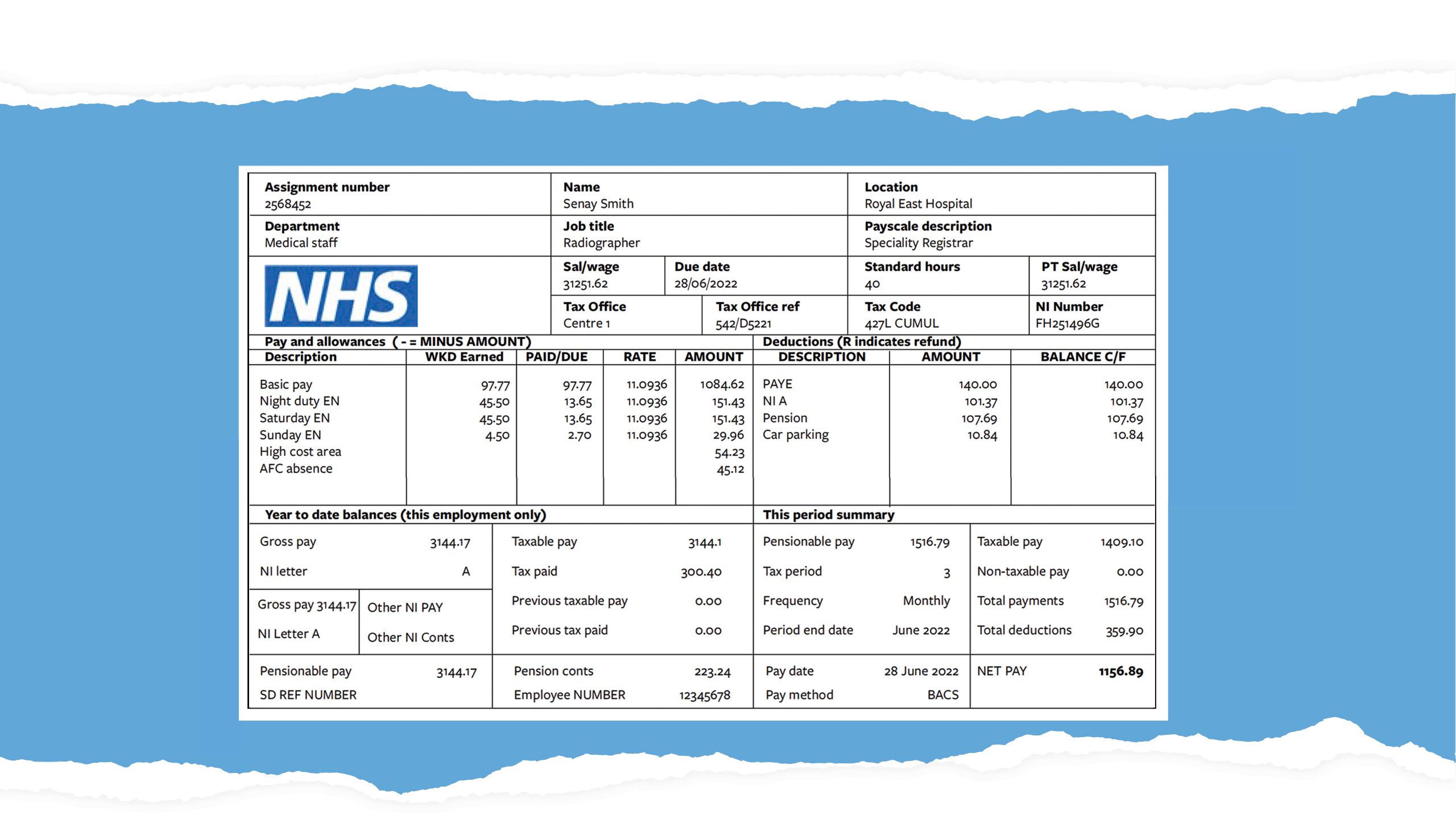
Example payslip


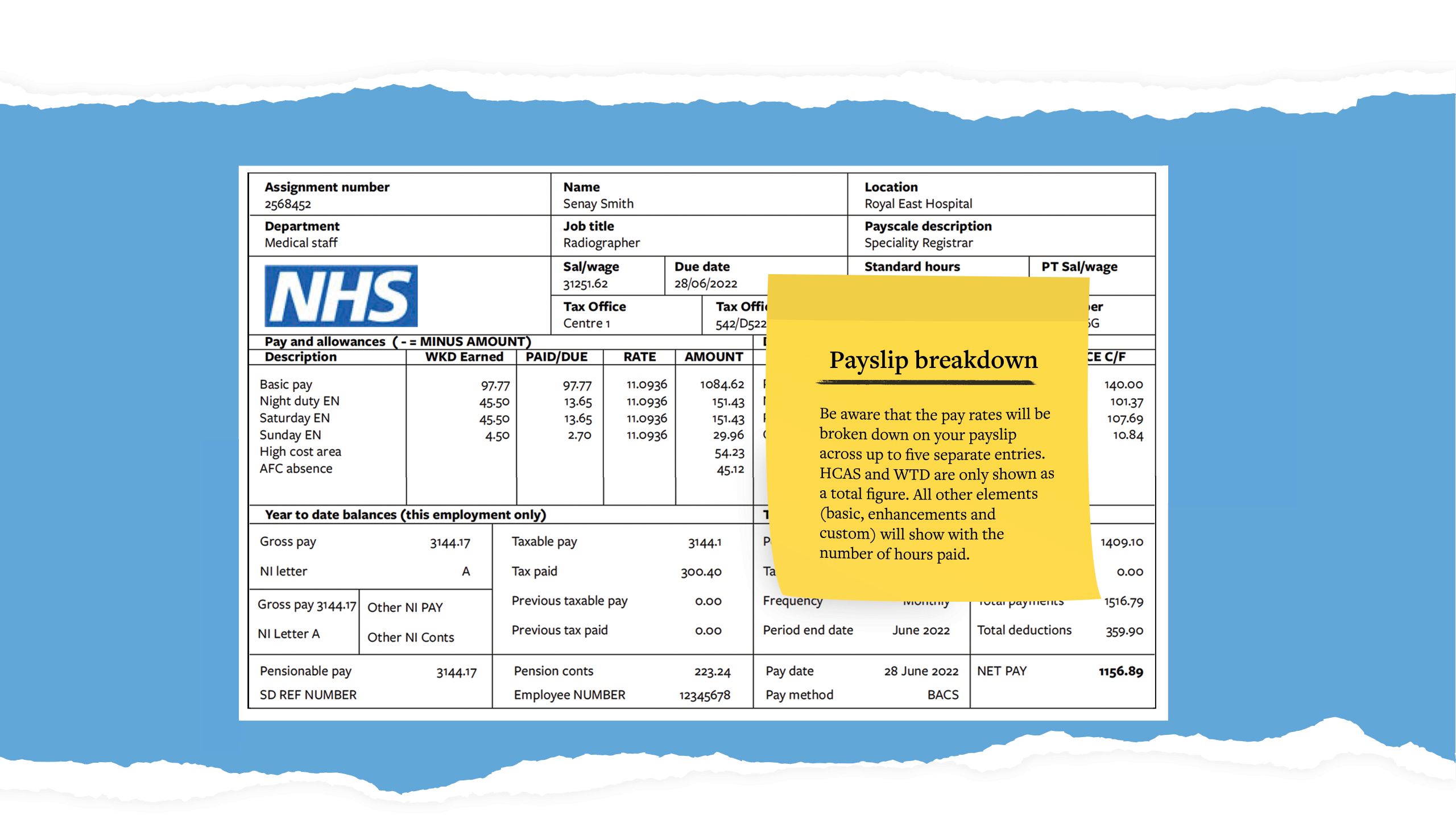

Example: Band 5 Saturday (11.5 hours)
Enhancement entries are shown as the proportion of the total hours worked, multiplied by the basic hourly rate of pay. In this example, 3.45 hours paid/due Saturday enhancement, times the basic £14.70 hourly rate represents the 30% per cent uplift for the 11.5-hour shift.
|
Element |
Payslip description |
|---|---|
|
Basic |
Add basic pay |
|
Enhancement |
Unsocial EN Saturday EN |
|
HCAS |
Fringe |
|
Custom |
151 Band 5 Custom UP |
|
Description |
WKD/earned |
Paid/due |
Rate |
Amount |
|---|---|---|---|---|
|
Add basic pay |
11.50 |
11.50 |
14.7000 |
169.05 |
|
Saturday EN |
11.50 |
3.35 |
14.7000 |
50.72 |
|
Fringe |
8.51 |
|||
|
151 Band 5 Custom UP |
11.50 |
1.8400 |
21.16 |
|
|
WTD pay |
27.55 |
Payslip terminology
|
Terminology |
Description |
|---|---|
|
ESR |
Stands for Electronic Staff Records. This is the system that contains all of your contractual information and ‘pays’ you each month. |
|
Assignment number |
This is an important identifier and should be quoted in all pay-related queries and correspondence you may have. |
|
Location |
Refers to your work base; the ESR system has you based at this place. If you claim your expenses-through ePay or similar, this will be used to calculate mileage claims, so should be correct. |
|
Payscale description |
This is your pay band, which contains your annual salary and whether your role is clinical or non-clinical. ‘Non Review Body’ would usually refer to non-clinical staff and ‘Review Body’ would usually refer to clinical staff. |
|
Sal/wage |
This is the annual whole-time salary for your band and pay point. If you are part time, your actual annual salary (based on your working hours) is displayed in the PT sal/wage box (see below). |
|
INC date |
This is your personal incremental date. This is usually the start date of employment in the trust/NHS but could be changed upon promotion to a higher band or promotion within a band. |
|
STD hours |
Means ‘standard hours’; this is your contracted standard hours that you are paid for each week. If you work in term time only, this figure should be different from your actual hours worked because our pay is averaged out over the entire year. |
|
PT sal/wage |
This is the salary you receive and, if you are part time, is less than the figure in the sal/wage box. |
|
Tax code |
The tax code provided from coding notices sent from HMRC. |
|
National insurance contributions |
You pay NI contributions if you are employed and you are aged 16 and over, as long as your earnings are more than a certain level. If you are employed, you stop paying contributions as soon as you reach state pension age. |
|
Pay and allowances |
The monies that you are entitled to receive will be shown here. Basic pay for contracted staff is for the current month. Additional payments will usually relate to the previous month. |
|
WKD/earned |
The total hours worked (for basic pay this is typically contracted hours x 4.345 weeks). |
|
Paid/due |
This is the part of the payslip that causes most confusion. The hours displayed in this column are the number of hours to be paid (at full hourly rate) for the work undertaken. For example, if a radiographer receives a 30% enhancement for working a night duty, the hours worked (45.5) are multiplied by the rate due (30%) to give the hours to be paid (13.65). |
|
Rate |
Standard hourly rate. |
|
Amount |
Amount due. |
|
Year to date balances |
This area shows cumulative totals for PAYE (income tax), national insurance and pension from the beginning of the tax year up to and including the current pay period. |
|
This period summary |
This section provides details relating to your current payment. Totals of payments and deductions are shown together with details about the pay period itself and when you can expect your net pay to be paid. |
|
Net pay |
The amount of pay that will be transferred to your bank account. |
|
Deductions |
Your total earnings will be assessed each period and any resulting statutory and/or voluntary recoveries will be shown here. |
Common pay questions
- You or the employer may have received a revised coding notice from HM Revenue and Customs (HMRC).
- You may have contacted HMRC to advise it of a personal change and this has resulted in a new coding notice being sent.
- Start of a new financial year changes in line with HMRC legislation. You should log a call with the Payroll Helpdesk if you have a query about your tax code, but please note that the employer is not able to reverse or ignore tax code changes and cannot return any money taken by HMRC.
About the author
Richard Pembridge is the SoR regional officer for the Midlands. The SoR has a host of resources and signposting to external pensions information available to members at its online Payslips and Pensions hub.
Image credit:
Getty Images


Read more